Choose cleanup, colour interpretation or a modern-looking version
‘Improve this old photo’ could mean three different jobs. Cleanup reduces visible damage while trying to retain the picture's character. Colourisation adds colour choices that may not be known. A modern-looking version reinterprets the appearance of the scene. Say which you want before the edit begins.
‘Update this photo as if it was taken with an iPhone’ is a useful creative direction, but not a forensic restoration instruction. A model can produce convincing new texture, facial detail or colour that was never in the scan. Preserve the original and label the edited version honestly.
| Your goal | Ask for | Check especially |
|---|---|---|
| Keep the memory as close as possible | Gentle dust/scratch cleanup; preserve faces and film texture | Age, expression, hands and clothing patterns |
| Try a colour version | A labelled interpretation using known colours where supplied | Unverified colours mistaken for fact |
| A modern keepsake | A separate natural smartphone-looking version | Face redesign, invented detail and modern objects |
Start with a careful scan and keep the original
The US National Archives advises keeping originals after digitising and handling them carefully. Use a suitable scanner or careful copy photograph; do not force a valuable print flat or put fragile material through an automatic feeder. Ask a conservator if handling is causing damage.
Keep the physical print and an unedited digital master, with backups. Work on a separate copy and use names that distinguish the scan, cleanup and creative versions. Record known names, dates and places separately rather than asking AI to identify people or guess the occasion. Check your upload/privacy settings and permission before sharing family images.
Our example starts with a fictional old-photo scan
We created this faded, scratched snapshot-style image as a teaching example. It is not a reader's family photograph, an archive document or evidence of a real event. The two adults, house and garden are fictional.
The full starting prompt is below so you can see how the example was made. For your own restoration, upload your authorised scan instead of generating a new ‘old’ picture.
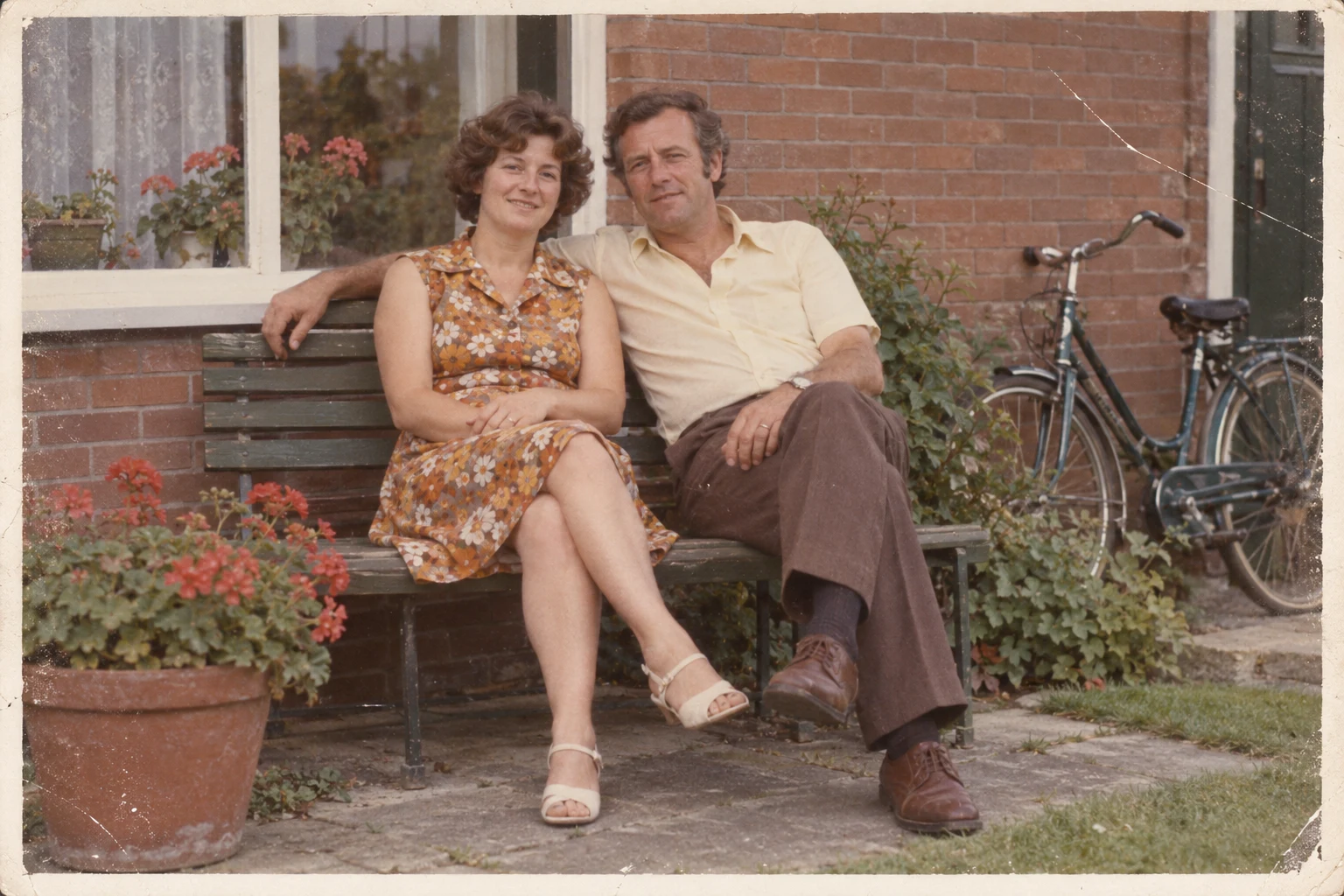
Create a landscape synthetic teaching image that resembles a faded scanned family snapshot from about 1975. Two fictional adults in their forties sit on a garden bench beside a modest brick house, with a bicycle leaning on the wall and a flower pot near the bench. Both faces visible, natural expressions, ordinary period clothing. Straight-on eye-level framing, daylight. A slightly faded colour print with muted warm tones, fine film grain, mild surface scratches and a narrow off-white print border; a small scratch crosses empty wall but not faces. Keep faces and hands readable enough for a later conservative restoration demonstration. No text, no date stamp, no watermark. These are entirely invented people and a fictional scene, not a real archival photo.
First try: remove damage without changing the memory
This edit reduced the prominent scratch across the upper-right wall and made the image clearer. The print border and period clothing remain visible. It is a useful illustration of restrained cleanup, not proof that every facial feature or fine texture stayed identical.
Compare faces, hands, clothing patterns and small background objects at full size. If identity drifts, return to the original and ask for less intervention, or use manual restoration. Do not keep feeding an increasingly altered face into more ‘improvement’ requests.
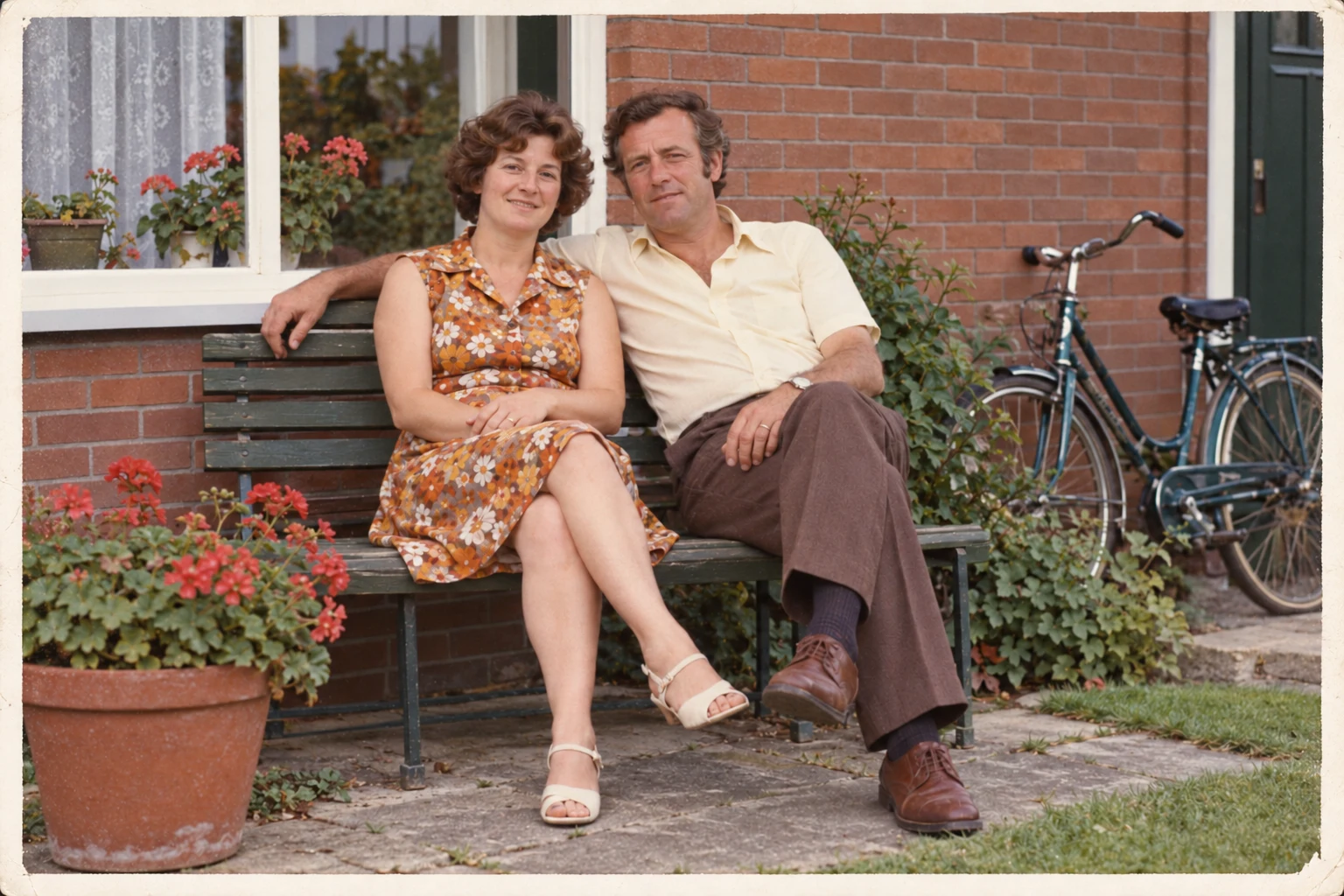
Conservatively restore this synthetic old-photo scan. Reduce visible surface dust and scratches and gently improve faded contrast. Preserve the two people's facial features, apparent age, expressions, pose, hands, clothing pattern, bench, house, bicycle, plants, framing and off-white print border. Retain a natural film texture and the existing muted colour character. Do not beautify faces, smooth skin, colourise differently, add objects or reconstruct uncertain details. This is cleanup, not a modern re-creation.
Second try: as if the photo were taken with an iPhone
We made this separate version from the starting scan, not from the cleanup. The aim is a natural contemporary photographic appearance, not replacing the clothes or moving the people into the present day.
Compare it with the original before choosing it for an album. Even with instructions to preserve identity, clearer-looking skin, eyes and fabric may be generated interpretation. ‘iPhone’ describes the requested look here; it does not mean an actual iPhone captured the image or that a particular camera profile was reproduced.
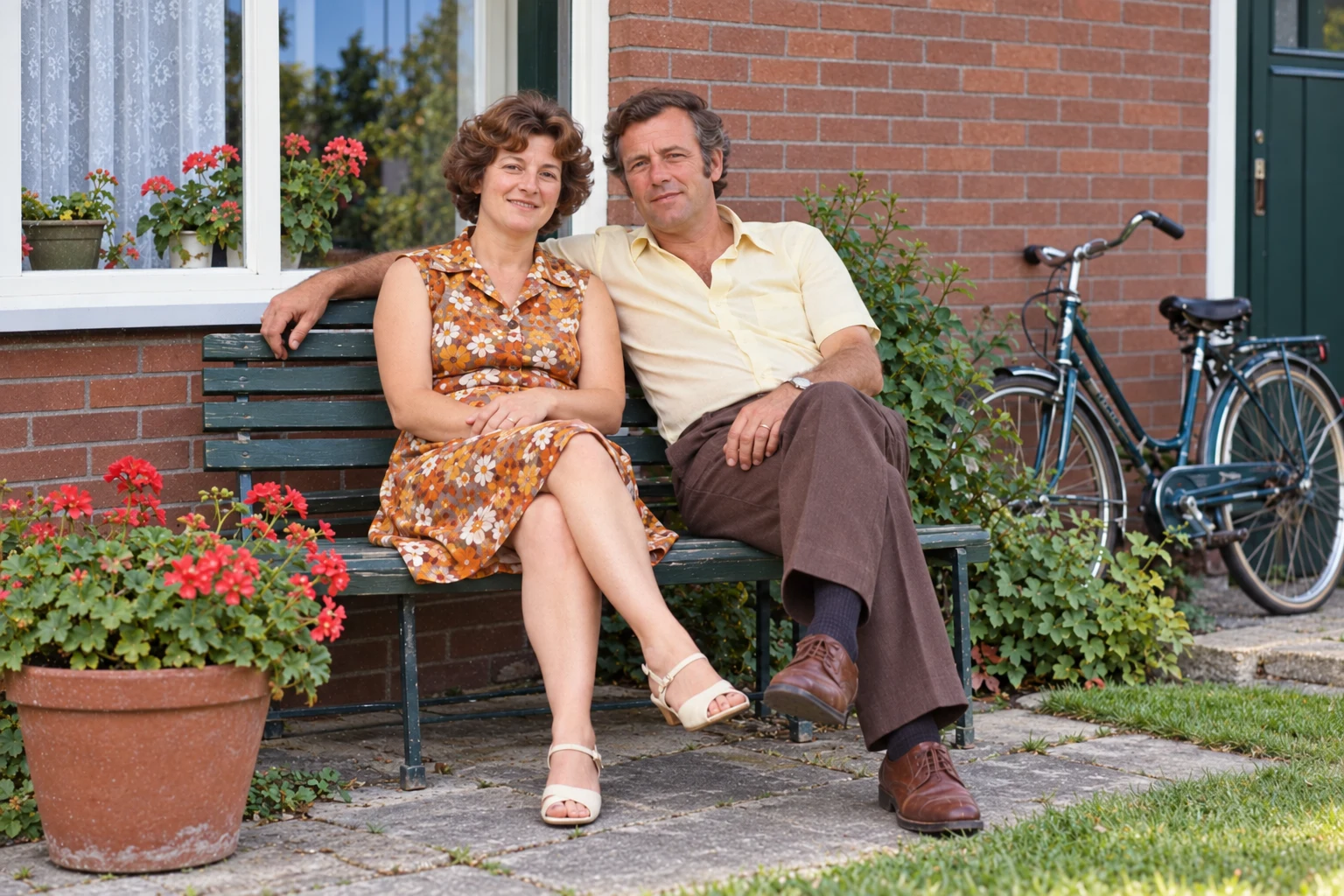
Make a separate creative reinterpretation of this synthetic old photograph as if the same moment were photographed with a modern iPhone in natural daylight: balanced white balance, believable colour, gentle contrast and clear but not oversharpened detail. Preserve the two people's facial features, apparent ages, expressions, poses, clothing, bench, house, bicycle and plants as closely as possible. Remove scan damage and the paper border without changing framing or adding modern objects. No beauty filter, face redesign, artificial portrait blur or cinematic lighting. This is an illustrative modern-looking interpretation, not recovery of historical facts.
Do not turn a blurry face into invented certainty
Ask for reduced noise and gentle contrast rather than ‘make every detail sharp’. If the file does not show an eye, badge, inscription or facial feature clearly, a plausible replacement is not recovered evidence. There is no prompt that guarantees identity preservation or reconstructs missing historical information.
For black-and-white photographs, keep a monochrome cleanup if fidelity is the goal. Make any colour version separately and identify known colours versus guesses. Do not use an enhanced face or rewritten text as identification, legal evidence or proof of an event.
Compare my original scan with this edited version. Check faces, apparent ages, expressions, hands, clothing patterns, background and crop. Describe visible changes and areas that remain uncertain. Do not identify the people or present generated detail as recovered fact. Tell me which changes need a family member or restoration specialist to review.
Common questions
Can AI restore the real colours of a black-and-white photo?
Not from that image alone with certainty. Supply known colour references and label unknown colours as an interpretation.
Can I ask for the photo to look as if it was taken today?
Yes, as a separate creative version. Specify natural light, restrained detail and what must stay the same, then inspect identity and other unintended changes.
Should I throw away the print after scanning?
No. The National Archives advises retaining originals after digitising. Digital copies also need backups and preservation.
Keep exploring
Sources and how this guide was prepared
Sources checked 10 October 2026. The starting photograph and both edits were created for this site using OpenAI's built-in image tool. The people and scene are fictional. These actual generated examples illustrate the workflow; they are not evidence that a real historical photograph was recovered or that identity was preserved perfectly. The prompts and visible limitations are disclosed.